SnapClaim vs the market of AI receipt scanners
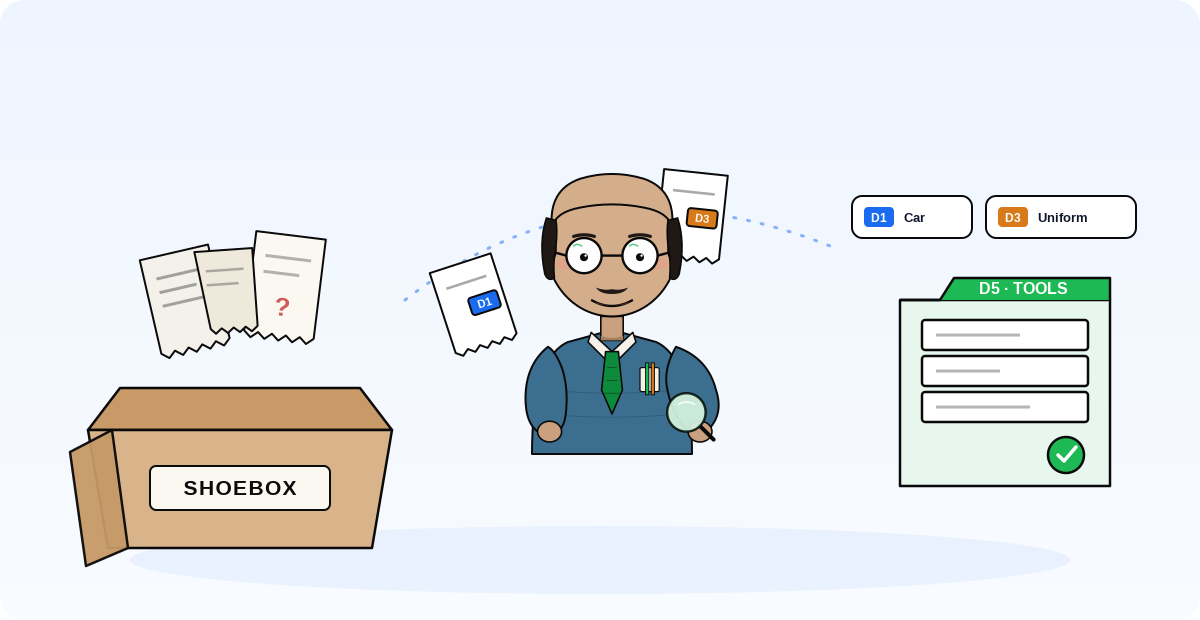
There are more AI receipt scanners now than there are drawers to lose receipts in. A lot of them are genuinely clever — point your phone, and the merchant, date and total appear like magic. But here's the thing almost nobody says out loud: reading a receipt and claiming a receipt are two completely different jobs. Most of these apps do the first one brilliantly and stop right where the money is. SnapClaim was built to do the second one.
The bit everyone confuses
When people say "receipt scanner", they're usually picturing one product. There are actually two, and they're built for two different people.
Capture it
Read the receipt, pull out the numbers, and file it into a business's accounting software or an expense report. Fast, tidy, ledger-ready.
Built for → businesses & bookkeepersClaim it
Decide whether the purchase is actually deductible, put it under the right ATO category, and have it sitting ready for your tax return.
Built for → you, the taxpayerTools like Dext, Hubdoc, Expensify and Shoeboxed — and the receipt capture built into Xero and QuickBooks — are excellent at the first job. That's what they're for: feeding a company's books so a bookkeeper or accountant can do the rest. If you run a business with a ledger, they earn their keep.
But if you're a nurse, a sparky, a teacher or a sole trader, you don't have a bookkeeper reviewing your books every month. You've got a phone, a job that costs you money to do, and a return to lodge. The generic scanner hands you a neat pile of captured receipts and then goes quiet on the one question that actually matters: can I claim this, and how?
Where the generic scanners stop
Run the same fuel receipt through a typical AI scanner and a $60 total pops out, filed under the merchant's name. Useful — but it won't tell you that fuel for a work car is a D1 deduction, that it only counts for your work-use portion, or that it belongs in this financial year, not the last one. Three more things stand between that captured receipt and money back in your pocket, and most apps leave all three to you:
- Is it even claimable? A receipt scanner captures everything equally — your work boots and your Sunday groceries get the same treatment. It doesn't know the difference. That call is left to you.
- Which category? Australian deductions live under specific ATO codes — D1 for car, D3 for uniforms and protective clothing, D5 for tools. Put a claim under the wrong one and it can be knocked back. Generic scanners don't assign these.
- Which year, for which job? Our tax year runs July to June, and what's deductible depends on your occupation. Tools built for a US expense report or a generic ledger simply don't think that way.
None of that is a knock on those apps. They're just not aimed at you. They're aimed at the bookkeeper who picks up where they leave off — and that bookkeeper is exactly who most everyday Australians don't have.
What SnapClaim does instead
SnapClaim starts where the others stop. You snap the receipt, and Oscar — our AI — doesn't just read it, he rules on it:
- He decides if it's deductible and, if it is, assigns the exact ATO code — the same D1 / D3 / D5 an accountant would use.
- He works to your occupation. Tell Oscar you're a chef or a carpenter and he judges each receipt the way the ATO would for your line of work.
- He learns your regulars. Once he's seen your usual suppliers a couple of times, he sorts them the same way every time — and quietly gets sharper.
- He checks the paperwork. Oscar verifies the supplier's ABN against the national register and flags whether a receipt is a proper tax invoice, so a claim holds up if it's ever questioned.
- He keeps the years straight. Everything files under the correct financial year automatically, rolls over on 1 July, and nothing gets lost.
The picture at the top of this page is the honest version of the whole thing: the shoebox goes in one side, and sorted, categorised, claim-ready deductions come out the other. That's the job. Not "here are your receipts" — but "here's what you can claim."
Let's be fair about it
We're not here to tell you the big scanners are bad — they're not, and pretending otherwise would be silly. If you run a business, have a bookkeeper, and need receipts flowing straight into Xero or a monthly expense report, a purpose-built capture tool is the right call, and SnapClaim isn't trying to be your general ledger. Plenty of people quite reasonably use both: a capture tool for the business books, and SnapClaim for their personal deductions.
The distinction is simple. Ask yourself what you actually want at the end of it:
- If you want receipts in your accounting software for someone else to process — a business capture tool is built for that.
- If you want your deductions found, sorted and ready so you personally keep more at tax time — that's the exact gap SnapClaim was made to fill.
One more thing worth saying plainly: SnapClaim is priced for a person, not a firm. Most of the capture tools charge per business, per user, per month, because that's who they serve. We built ours for the tradie in the ute and the nurse on a double, so it's priced to make sense for one human and one tax return.
The short version
An AI receipt scanner reads your receipts. SnapClaim reads them and works out what you can claim — under the right ATO code, for your job, in the right financial year, with the ABN checked and the paperwork flagged. Same photo, very different finish line.
If you've ever scanned a pile of receipts and still had no idea how much of it you could actually claim, that's the exact feeling we built Oscar to kill.
Turn the shoebox into a refund
Snap a receipt and watch Oscar sort it into the right ATO category — deductible or not, this year or last. Free to try, no credit card.
Open SnapClaimSnapClaim helps you capture and categorise deductions; it isn't a substitute for personal tax advice. For anything unusual, check with a registered tax agent — Oscar does the sorting, they sign the line.